Reported crashes
According to Notebookcheck, players on PS5 and Xbox Series have had to replay missions after crashes, and one player restarted the prologue several times. Output Lag describes the game closing to the home screen on the first loading screen, in the opening cutscene or during the prologue, sometimes with a PS5 error code such as CE-108255-1. For that code, PlayStation's help page just says an error occurred with the game or application and suggests updating the game.
Output Lag also lists freezes mid-play, sound cutting out on PS5 and choppy dialogue through headsets on Xbox. These are player reports: Rockstar has confirmed none of them specifically. Its November 23 notes announce fixes for "several issues that caused the game to crash", without details.
Which updates have been released?
As of November 24, we have sourced one update before launch and one after:
- 01.002.002 on PS5, 1.0.2.2 on Xbox, November 23: the first since launch, according to VICE; ComicBook calls it the first "big" update. According to VICE, citing dataminer Tex2, it weighs 603.8 MB on PS5 and 1.6 GB on Xbox, and reached PS5 in three waves spread over about six hours.
- 1.002.000, November 13: according to RockstarINTEL, it arrived around midday UK time for some PS5 players who had preloaded the game, at roughly 1GB; on Xbox, it came in at around 2.2GB. We found no official notes for that version.
The 7 official notes for the November 23 patch are on our GTA 6 update patch notes page.
What the November 23 patch fixes
According to Rockstar's notes as reproduced by VICE, PlayStation LifeStyle and ComicBook, update 01.002.002 fixes several issues that caused the game to crash, an issue that stopped the game autosaving correctly, and several issues with phone calls not triggering, including those that progressed the story or unlocked mission content. It also fixes weather that stopped changing, a Wanted Level players could not lose, the deadlift bar in the Gym and partners not handing over bags to sell to fences.
The notes do not say which crashes were fixed, or whether progress already lost can be recovered. Before this patch, Output Lag noted that Rockstar had posted no known-issues list or patch date. Output Lag also advises turning on automatic updates to get the next ones as soon as they land. If the game still crashes with the update installed, follow the steps below.
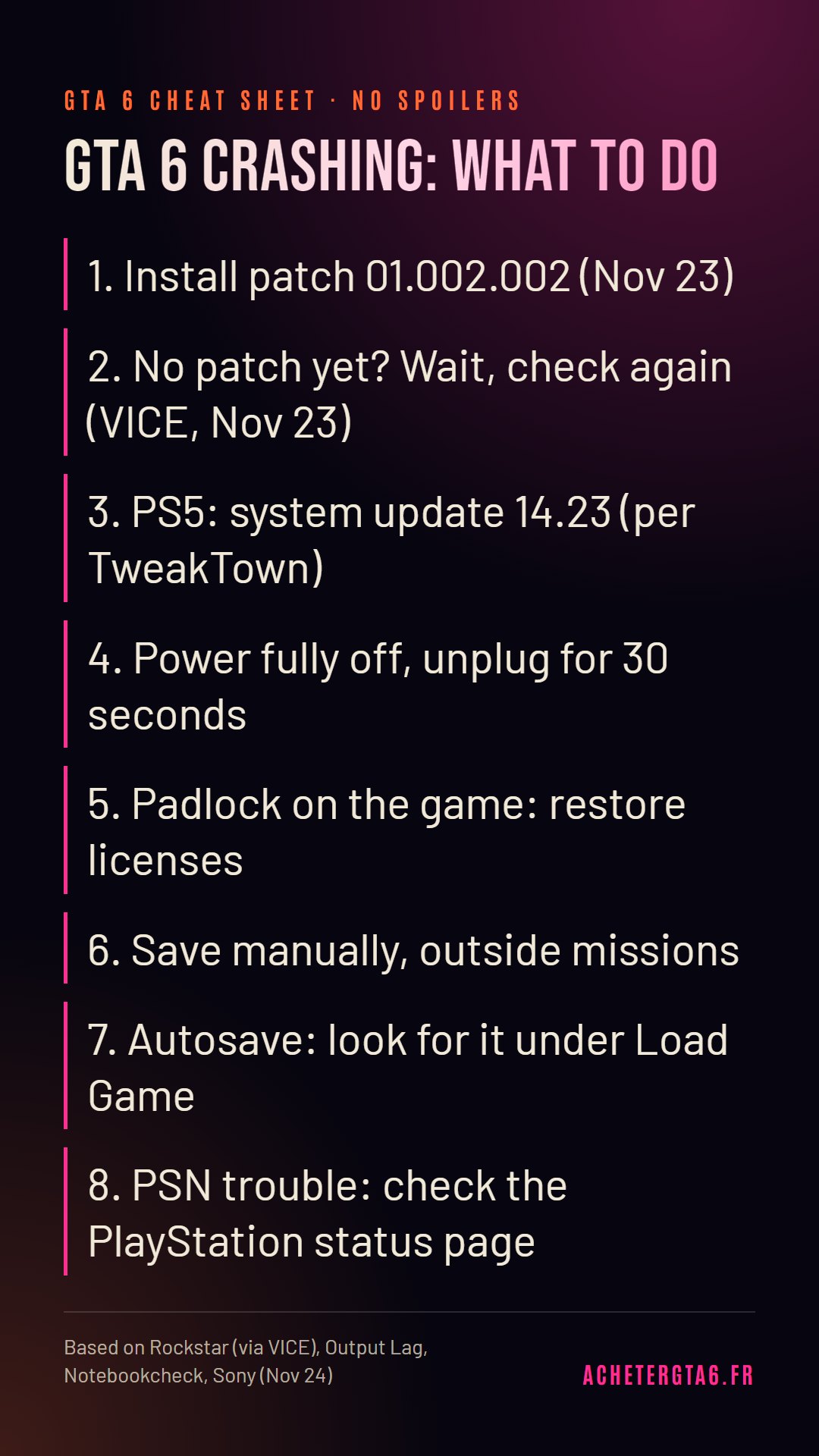
What to do if the game crashes
- Update the console system software. PS5: Settings, System, System Software. Xbox: Profile & system, Settings, System, Updates.
- Make sure the latest GTA 6 update is installed, 01.002.002 as of November 24 (on PS5, press Options on the game, then Check for Update).
- Power the console fully off, not into Rest Mode, unplug it for 30 seconds, then start it again.
- Note the exact error code and look it up on Sony's or Microsoft's support site.
- On PS5, if it keeps happening: Safe Mode, then Clear Cache and Rebuild Database.
- As a last resort, move or reinstall the game on internal storage, then contact Rockstar Support with the error code.
These steps come from Output Lag, which takes them from Sony's and Microsoft's support pages. On November 23, VICE advised waiting, then checking again. Going by its schedule, every PS5 player was due to have the patch about six hours after the rollout began.
PS5 overheating or switching off
Output Lag relays base PS5 and PS5 Pro consoles showing the overheating warning or turning off within minutes, often in the prologue. Notebookcheck suggests the hardware may be overstressed, without confirmation. Sony's advice, as quoted by Output Lag: keep at least 10 cm of free space around the vents, avoid thick carpets and cramped spaces, and dust the vents with the console unplugged. If it still shuts off, contact PlayStation Support.
How not to lose progress
Many losses come from the autosave, which happens less often than you might think. According to Kotaku and VGC, it triggers after main story missions and some side missions, never during a mission. Notebookcheck adds that it does not trigger in the prologue or at some checkpoints. Before switching off, save manually: menu, Game tab, a slot. It is not possible during missions, in combat or with the police after you, per Kotaku and VGC. According to Rockstar's notes, the November 23 patch fixes an issue that stopped the game autosaving correctly; Rockstar does not say which one.
Notebookcheck notes that the save menu does not show the autosave: after a crash, use the load menu to find it. Details on our how to save in GTA 6 page.
PSN at launch
On November 18 and 19, thousands of players in the US and UK reported PlayStation Network sign-in and connection problems on Downdetector, according to IBTimes UK and Digit. Figures vary between outlets, since Downdetector counts reports, not confirmed outages. According to IBTimes UK and Digit, Sony's status page warned of difficulty launching games, apps or network features; at other times, Notebookcheck saw it showing no issues. Sony gave no cause, and IBTimes UK stresses that no link to GTA 6 has been proven. An update to Digit's article on November 19 says Sony fixed the outage. Looking back, Push Square wrote on November 21 that the PSN outages on the evening before launch were minor and scattered, never affected everyone, and that the network recovered fast. If the game will not start, check the PlayStation status page first, as IBTimes UK and Output Lag advise.
Game won't start: firmware 14.23 and licenses
On PS5, GTA 6 requires system update 14.23, according to Notebookcheck, TweakTown and Shacknews. TweakTown quotes Sony's PS Support account on X: "Sony Interactive has issued a PS5 system software update that is required before playing Grand Theft Auto VI". That post names no version: TweakTown identifies it as 26.07-14.23.00. Sony's system software support page, re-checked on November 22, lists version 26.07-14.23.00 as the latest, with security fixes, right after 26.07-14.22.00; it does not say that version is required for GTA 6. On November 13, RockstarINTEL still gave 14.22 as the required version: that was before 14.23 came out, which Shacknews dates to November 17. Only Notebookcheck says players who preloaded the game are also affected. To check, Shacknews says go to Settings, System, System Software, Console Information: the number should include 14.23. Notebookcheck adds that PSN access is also used to verify you own the game. If a padlock or countdown stays on screen, Output Lag points to a license problem: restore licenses on PS5, or check your Microsoft account order history on Xbox.
Our sources
- Notebookcheck, "GTA 6 PS5 and Xbox crashes are losing hours of progress, despite autosave system", Adam Corsetti, November 19, 2026.
- Output Lag, "GTA 6 Not Working? Day One Problems and Fixes", Steven Mills, updated November 19, 2026.
- Kotaku, "Be Careful With Auto-Saving In GTA 6, It Doesn't Happen As Often As You Think", Imran Khan, November 19, 2026.
- VGC, "GTA 6 PSA: Here's how GTA 6 autosave works", Jordan Middler, November 19, 2026.
- IBTimes UK, "GTA VI Launch Chaos? PlayStation Network Outage Reports Surge After 13-Year Wait for Release", November 19, 2026.
- Digit, "PlayStation down again: PS5 users unable to play GTA 6, Sony confirms PSN outage", Vikas Yadav, November 19, 2026.
- Notebookcheck, "GTA 6 causes PlayStation Network outages", Hannes Brecher, November 18, 2026.
- Notebookcheck, "Is Sony cracking down? PS5 update required to play GTA 6 following jailbreak development", Jacob Fisher, November 18, 2026.
- TweakTown, "Gamers can't play GTA 6 on PS5 without updating system firmware, Sony and Rockstar confirm", Derek Strickland, November 18, 2026.
- Shacknews, "How to check if your PlayStation 5 firmware is 14.23 for GTA 6", Sam Chandler, November 17, 2026.
- PlayStation, "CE-108255-1" help page.
- RockstarINTEL, "New GTA VI Update Released And Here's What You Need To Know", November 13, 2026.
- Push Square, "PS5 Survives GTA 6's Unfathomably Humongous Launch without a Hitch", November 21, 2026.
- PlayStation, "System software update features for PS5 consoles" help page, read on November 22, 2026.
- VICE, "GTA 6 Patch Update 01.002.002 Is Live on PS5 and Xbox Series X - Patch Notes", Brent Koepp, November 23, 2026 (dash in the headline replaced with a hyphen).
- PlayStation LifeStyle, "GTA 6 PS5 Update 1.002.002 Rolling Out Now", Zarmena Khan, November 23, 2026.
- ComicBook, "GTA 6 Gets First Update Following Release, Full Patch Notes Revealed", Logan Moore, November 23, 2026.
Read on November 19, 2026; updates, PSN and firmware re-checked on November 22, 2026; the November 23 patch read on November 24, 2026. We could not open Rockstar's support site directly; we cite its error article via Output Lag. This page reflects our sources as of November 24, 2026.